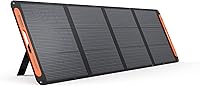
How to Use Jackery Solar Panels
To use Jackery solar panels, check your power station’s input and connector, unfold and angle the panel in direct sun, then connect it as the manual directs. Keep cables and ports dry, and disconnect before moving or storing the panel.
On this page (8 sections)
- How do you set up a Jackery solar panel?
- How do you check compatibility before connecting?
- How do you position a panel for better charging?
- How do you connect panels to a Jackery power station safely?
- Can you use a non-Jackery panel with a Jackery station?
- How should you care for Jackery solar panels between sessions?
- What should you check if the panel is not charging?
- How to use Jackery solar panels for your setup
To use Jackery solar panels, check your power station’s input and connector, unfold and angle the panel in direct sun, then connect it as the manual directs. Keep cables and ports dry, and disconnect before moving or storing the panel.
A solar panel can charge only as quickly as sunlight, panel placement, and the power station’s input allow. For RV-specific setup advice, see how to use RV solar panels.
Start with the manual for your exact models, since connections and limits can vary.
How do you set up a Jackery solar panel?
Place the panel in direct, unshaded sunlight and connect it to a compatible power station. Check the panel and station manuals first for the correct cable, connector, and solar input limits.
- Set the power station on a stable surface where it can stay dry and ventilated.
- Unfold the panel and set its support legs, if included.
- Face the panel toward the sun, avoiding shade from trees, vehicles, or buildings.
- Connect the approved cable to the panel and the matching solar input.
- Check the station display to confirm solar charging has started.
If the display shows no input, disconnect and check the connectors, cable, and compatibility. Don't force a plug or add an adapter unless the manufacturer says it is suitable.
Panel output changes with sunlight and placement. Check the display after setup, then reposition the panel if shade moves across it.
How do you check compatibility before connecting?
Match the panel connector and output to the power station’s solar input. The Jackery SolarSaga 200W includes a multiple-function cable with DC8020, DC7909, USB-A, and USB-C connectors, but its stated power station compatibility is limited to certain Explorer models.
For an RV setup, see how to wire solar panels on an RV.
Jackery names the Explorer 1000 Plus, 2000 Pro, 2000 Plus, and 3000 Pro as compatible with this panel. Confirm your exact model and its input limits before connecting, even if a plug appears to fit.
The SolarSaga 200W also has USB-A and USB-C ports for direct device charging. Its included charging cable is not weatherproof, so keep it dry.
For help choosing a panel by station capacity, see which solar panel size you need. Our guide to best solar panels for Jackery compares options for different setups.
How do you position a panel for better charging?
Give the panel a clear view of the sun and adjust its angle as the sun moves. Even partial shade can reduce the sunlight reaching the cells and slow charging.
Set the panel on firm ground or another stable surface. Keep it clear of puddles, sprinklers, vehicle exhaust, and foot traffic.
Avoid placing the panel behind a window or under a tent roof if you want it to receive direct sunlight. Check the station’s input display after repositioning to see whether the change helps.
The Jackery SolarSaga 200W is foldable and has an ergonomic handle, which can make it easier to move between sunny spots. For a closer look at its features, read our Jackery SolarSaga 200W solar panel review.
Can a Jackery panel charge in cloudy weather?
A panel may still produce power on a cloudy day, but expect less output than in direct sun. Clouds reduce the sunlight that reaches the cells, and dense shade can slow charging further.
Move the panel to the brightest open area available. Check the power station display instead of assuming the panel is charging at its rated maximum.
How do you connect panels to a Jackery power station safely?
Use the connection method and solar input limits specified for your exact station. Check the panel’s connector, cable, and the station’s manual before adding a second panel or another adapter.
Turn off or disconnect equipment as the manufacturer directs before changing connections. Keep connectors clean and dry, and never connect or disconnect with wet hands or while standing in water.
Don't assume that two panels with the same wattage can be combined safely. The station’s maximum solar input and the panels’ combined electrical output must be compatible.
The Jackery Solar Generator 1000 v2 bundle includes a 200W panel. Its stated charging details say the station can reach 80% in 6 hours using a 200W solar panel, though actual time depends on sunlight and other conditions.
The panel and station ship separately, so allow for separate deliveries if ordering the bundle. For more bundle options, see best Jackery solar panel and battery, or compare the best solar panel for Jackery 1000.
Can you use a non-Jackery panel with a Jackery station?
Some third-party panels may connect to Jackery stations, but compatibility depends on the connector and the station’s solar input limits. Verify both before connecting, and use an adapter only when its maker confirms it is suitable.
The ZOUPW 100W panel includes a five-connector cable with DC8020, DC7909, Anderson, XT60, and DC5521 ends. Its manufacturer names several compatible Jackery models, but you still need to check the exact station manual and solar input limit.
The panel can also charge devices through its built-in USB ports. Its panel body is rated IP67, but the USB hub and cables are not fully waterproof, so keep those parts dry.
How should you care for Jackery solar panels between sessions?
Disconnect the panel, let it dry, and store it folded in a clean, dry place. Keep cables from tangling or being pinched, and avoid setting heavy objects on the panel.
Wipe off loose dust with a soft, dry cloth. If the panel is wet, let it dry fully before folding and storing it.
A panel cover can help keep dust and scratches off during storage, but it should fit without bending the panel or pressing on its surface. Check the panel’s dimensions and care instructions before choosing a cover.
For outdoor generator storage, compare best generator cover for outdoor use and best generator cover for home backup; those covers are for generators, so confirm size and intended use before buying.
For a basic explanation of cell types and their differences, see what a monocrystalline solar panel is.
What should you check if the panel is not charging?
Check sunlight, shade, connections, and the station’s input display first. If the station still shows no solar input, disconnect the panel and consult both manuals before troubleshooting further.
- Move the panel into brighter, unshaded sunlight.
- Confirm every connector is fully seated and matches the input.
- Check that cables and ports are dry and undamaged.
- Verify the panel is compatible with the station and within its solar input limits.
- Reposition the panel and check the display again.
Do not open the panel or power station to inspect internal parts. Contact the manufacturer if the manual’s troubleshooting steps do not resolve the issue.
How to use Jackery solar panels for your setup
To use Jackery solar panels, match the connector and input limits, place the panel in open sun, and confirm charging on the station display. Move the panel as shade shifts, keep the cables dry, and store it clean and dry between sessions.
Choose a bundled station and panel if you want a coordinated setup. If you already own a station, check its manual before selecting a panel or adapter.
Our score weighs specs, features and buyer feedback against what you’re shopping for.
Frequently asked questions
How do you connect a Jackery solar panel to a power station?
Check the panel connector and the power station’s solar input before connecting. Use the cable and adapter approved for that model, then connect the panel and place it in sun.
Follow both manuals for input limits and setup, and keep cables and ports dry.
Can you leave a Jackery solar panel outside?
Use the panel outdoors only within its stated weather and temperature limits, and protect its cables, connectors, and power station from moisture. Jackery rates the SolarSaga 200W panel IP68, but its included charging cable is not weatherproof.
Disconnect and store equipment when conditions exceed its instructions.
Do Jackery solar panels work on cloudy days?
They can still produce power in cloudy conditions, but charging may be slower because less direct sunlight reaches the cells. Keep the panel unshaded and adjust its position as the sun moves.
Check the power station display to see whether it is receiving solar input.
How should you store Jackery solar panels between uses?
Disconnect the panel, wipe away dirt with a soft dry cloth, and let any damp areas dry before folding it. Keep the panel and cable in a clean, dry place, away from sharp objects and heavy items.
Follow the model’s care instructions, and use a cover only if it fits without pressing on the panel.